Tebex Integration
Why use Tebex Integration? It allows you to automate the process of selling reward coins. Players can purchase packages on your Tebex store and redeem their transactions instantly in-game through the UI, without needing staff intervention.
Make sure your server is properly authenticated with Tebex. You must have your Tebex Secret Key set in your server.cfg for the commands to be received.
Step 1: Connect your server with Tebex
Go to creator.tebex.io , select the Integrations tab, and go to Game Servers. Create a new game server and follow the instructions. Copy the Secret Key provided.
Step 2: Configure server.cfg
Open your server.cfg and add the following line with your secret key:
sv_tebexSecret your_tebex_secret_keyAfter restarting your server, you should see a message in the console confirming authentication: Authenticated with Tebex.
Step 3: Add your package
In your Tebex dashboard, select Packages and create a new Package. Configure the title, price, description, and photo as desired.
Step 4: Add Game Server Command
Add a Game Server Command to the package. Select the game server you created in Step 1.
Choose “When the package is purchased” as the trigger.
The command should be:
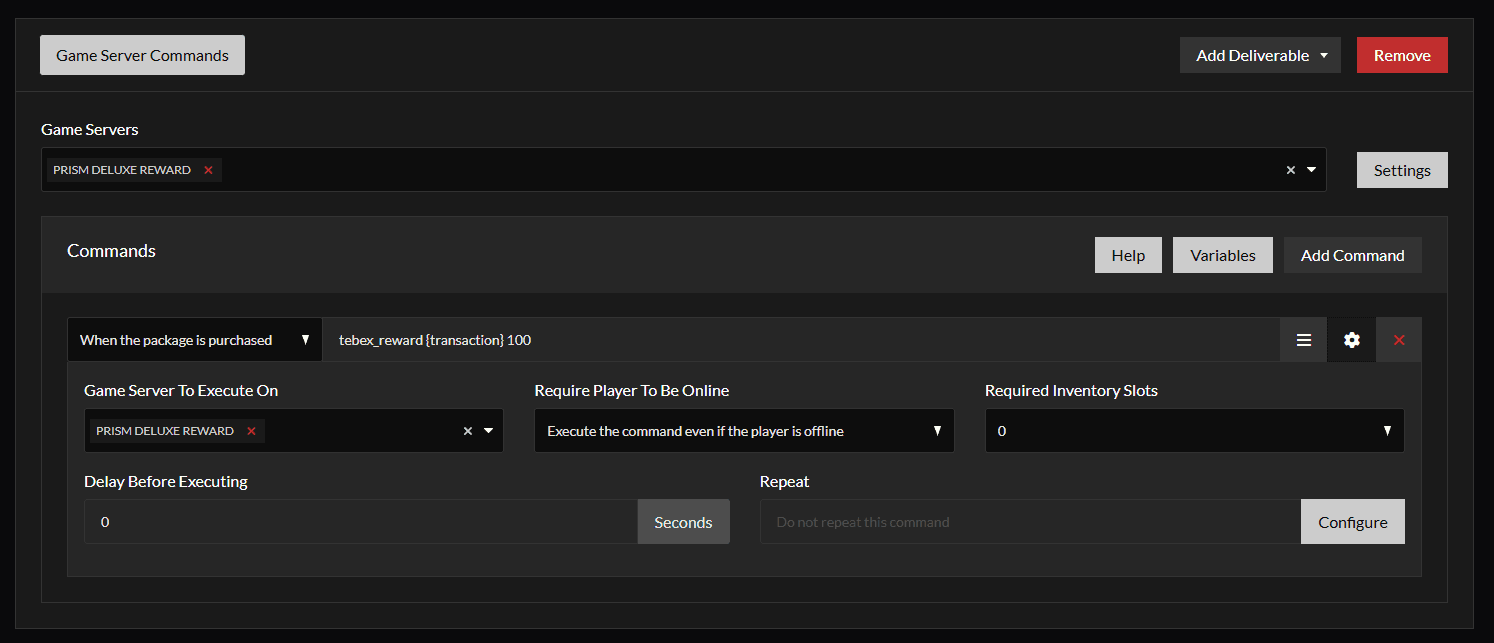
Note: Replace 100 with the amount of coins you want this package to grant.
Make sure to enable “Execute the command even if the player is offline”. The script will store the transaction ID in the database, allowing players to redeem it whenever they are online.
Step 5: Redeeming via UI
Once a player completes a purchase, they will receive a Transaction ID (e.g., tbx-9876543210-abcdef).
Instead of using commands, players can simply:
- Open the Rewards System UI in-game.
- Navigate to the Redeem section.
- Enter their Transaction ID into the input field.
- Click Redeem to instantly receive their coins.